Skip to content
  • +973 39969998, +973 39693931
  • Remote Support
  • Training
  • Dealer Portal
  • +973 39969998, +973 39693931
coding-center.comcoding-center.com
  • Login
  • Cart / .د.ب0,00 0
    • No products in the cart.

      Return to shop

  • 0
    Cart

    No products in the cart.

    Return to shop

Home / JLR Engineering Soft
JET-PRO

Demo JET-Pro Token JLR Engineering

.د.ب69,00

Bahraini dinar - BHD
  • Bahraini dinar - BHD

Demo Token JET-Pro JLR Engineering Tool Pro software.

1000 in stock

Purchase this product now and earn 69 Points!
SKU: DEMOJETPRO Category: JLR Engineering Soft Tags: 2001 land rover range rover p38 obd2 scanner reset, 2001 range rover p38 obd2 scanner reset, autel obd2 scanner range rover, best land rover diagnostic tool, best obd2 scanner for land rover, best obd2 scanner for range rover, best obd2 scanner range rover, hawkeye diagnostic tool for land rover vehicles, hawkeye diagnostic tool for land rover vehicles ba5070, JLR Enet WiFi, land rover discovery 2 obd2 scanner, land rover obd2 scanner, land rover u480 obd2 car diagnostic scanner, launch creader vii+ obd2 scanner range rover, obd2 scanner air suspension range rover, obd2 scanner air suspension range rover l322, obd2 scanner for land rover, obd2 scanner for land rover discovery 2, obd2 scanner land rover, range rover obd2 scanner
Categories
  • 48V Bettery
  • Electronic Ignition Switch
  • Electronic Steering Lock
  • Engine Control Unit
  • Head Unit Infotainment
  • Immobilizer Service
  • Instrument Cluster
  • JLR Engineering Soft
  • Key Programming
  • Map Update
  • Mileage Reset
  • OEM Retrofits
  • Transmission Control Unit
  • Uncategorized
  • Description

Demo Token License JET-Pro JLR Engineering Tool

JLR Engineering Tool Options

CCF Editors

We support CCF Editors for JLR from MY 2016 to 2023 Models, they are CCF Tools 4.6, CCF Tools 4.8, and CCF Tools 4.9.

  • MY2015 – 2024
  • CCF Editor
  • CCF Compare
  • Work with PF SDD

Start from $69

Order now

JET-Pro

JET Pro JLR Engineering Tool Pro supports JLR DOIP vehicles’ Diag and coding via JLR Enet without PF or TOPix.

  • MY 2018 – 2024
  • Diag Coding
  • No DOIP PF TOPix
  • Read/Write in the car

Start Demo $99

Demo Test now

JET-Master

All features from JET-Pro, JET Master full version support JLR programming via Enet, & remote support from us.

  • All feature JET-Pro
  • Programming
  • Used ECUs Prog
  • All keys were lost Prog

Remote/ $199

Apply for remote

JLR Engineering Tool Pro with Enet WiFi Adapter for JLR MY 2017-2024

The JLR Engineering Tool Pro and JLR Enet WiFi package offer a cost-effective solution for Land Rover and Range Rover diagnostic and coding. This combination is user-friendly and eliminates the need for an expensive Pathfinder and JLR DOIP interface. Additionally, a JLR TOPIx online account is not required for 2023 vehicle models. The package supports diagnostic and coding functions for JLR models from 2017 to 2023, making it a valuable tool for JLR OEM retrofit projects.
The JLR Enet WiFi is an essential hardware vehicle communication interface for Land Rover and Range Rover vehicles’ maintenance workshops and the JLR owners. The JLR Enet WiFi, which has been dubbed the best Land Rover diagnostic tool, Land Rover OBD2 scanner, and Range Rover OBD2 scanner, is capable of diagnosing a wide variety of Land Rover and Range Rover vehicles, including the Land Rover Discovery 2, making it a versatile device for a variety of maintenance tasks. The JLR Enet WiFi is also equipped to reset the 2001 Land Rover Range Rover P38 OBD2 scanner, making it a critical tool for monitoring your vehicle’s air suspension, particularly for the Range Rover L322.
How to use the JET Pro to enable the JLR hidden features?
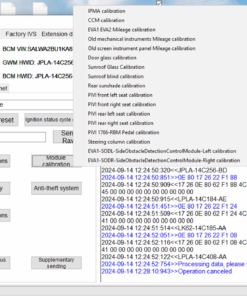
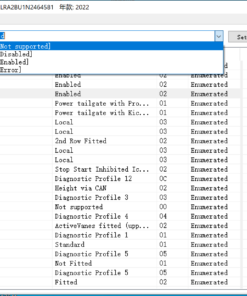
  1. Connect car and Read CCF, choose the parameters => Set => Write current data (or, as an alternative, use our “coding scripts” – set – write)
  2. Go to “MAIN” Menu Panel => CCF Memory choose “DADC + IGM”
  3. Check DTC, clear DTC, lock the car, and sleep the car for 10 minutes.
    Job done and enjoy.
Package includes:
  • Software installer
  • The demo license with full functions is valid for 72 hours to work with 1-VIN

Optional Hardware Features of the JLR Enet WiFi adapter:

  • Embedded UART-ETH-WIFI module
  • DC/DC converter for improved power consumption
  • Additional CPU heat sink for over-temperature protection
  • 2.4GHz 802.11b/g/n compatibility, default password 12345678
  • Support for IEEE 802.3 and IEEE 802.3u
  • WiFi Client/AP/Router Mode
  • Support for WPS/WDS
  • Baud rate range: 1200~500000bps
  • Support for transparent transmission mode
  • Multiple security authentication mechanisms supported: WEP64/WEP128/ TKIP/ AES WEP/WPA-PSK/WPA2-PSK
  • Wireless roaming support
  • Support for multiple network protocols: PPPoE/TCP/UDP/DNS/DHCP/DNS/HTTP/Firewire
  • Support for AT+ instruction set

Why JLR Engineering Tool Pro and JLR Enet WiFi package?

  • User-friendly software: Easy to use with click and play
  • cost saving without buying the expensive Pathfinder and JLR DOIP interface
  • no JLR TOPIx online account required for 2023 vehicle models
  • Support JLR 2017 – 2023 models diagnostic and coding functions
  • the best value tool for JLR OEM retrofit jobs
  • to flash/program the used or new control modules, please use JET-Master (SX-TOOL)
In addition to the JLR Enet WiFi, the software “JLR Engineering Tool Pro” is optional with limited to one specific VIN (car owner version) to be included for the package, making this a complete diagnostic and maintenance solution for your Land Rover or Range Rover. Whether you’re a professional technician or a do-it-yourself enthusiast, the JLR Enet WiFi and JLR Engineering Tool Pro will offer you all the information you need to maintain your vehicle. This potent combination of hardware and software makes the JLR Enet WiFi and JLR Engineering Tool Pro an indispensable tool for maintaining a Land Rover or Range Rover.
OEM ODMs are available, global dealers are WANTED for the best OBD2 scanner for the Land Rover.

Contact us for more details, global dealers are welcome.

JET Features
Flashing
Diag & Coding
Key Programming
Used ECU Prog.
CCF Editor to 2024
Self Coding Scripts
VCI Enet/JLR Enet WiFi
VBF Read/Write
Region Locked
Team Tec support
Online Post Update
License Release
Global Dealers
Master
YES
Y
Y
Y
Y
Y
Y
Y
N
Y
Y
Instant
Open
details
PRO
No
Y
N
N
Y
Y
Y
Y
N
Y
Y
Instant
Open
details
LOCKSmith
YES
N
Y
N
N
N
N
N
N
Y
Y
Instant
Open
details
CCF 4.9
No
N
N
N
Y
N
N
N
N
Y
Y
Instant
Open
details

Notes:

JET = Jaguar Land rover Engineering Tool, PF = Pathfinder, VCI Enet refers to any normal Enet like BMW Enet cable,

JLR Engineering Tools FAQs

  • What why
  • Returns & Support
  • Payments
What is JET Mean?

JET means JLR Engineering Tool, in China market we call it SX-tool (Super X).

JET Tools we have:

  1. JET Pro
  2. JET Master
  3. JET LS – LockSmith 
Which one shall I choose among JET Pro/Master/LS version?

The three tools below are used for different projects:

  • JET Pro = Diag + Coding with CCF Editor 4.9
  • JET Master = Diag + Coding with CCF Editor 4.9 + Programming
  • JET LS = Key Programming ONLY for Locksmith

More Information on the JET Tools:

  1. JET Pro
  2. JET Master
  3. JET LS – LockSmith 
The JET Tools Support SDD and Pathfinder Vehicles?

The JET JLR Engineering Tools only work with DoIP cars, which means that they will only work with Pathfinder vehicles from 2016 to 2023. For older SDD vehicles the JET tool won’t support.

What VCIs the JET tool required to work with?

JET Tools are all DoIP based solution, so we work with below tools:

  1. JLR Enet Wifi Adapter
  2. 3in1 Auto DoIP Interface
  3. Any regular BMW Enet cable
Will JET Tool work with my JLR DOIP?
It will, for sure. but a couple of conditions must be met:
  1. To use the original JLR DOIP VCI, you must first run Pathfinder with connection to the JLR DOIP VCI.
  2. The JET software will then talk to the JLR VCI when #1 is working.
Will JET tool work with 2024 models?
Yes it will.
Is there anyway to see which CCF files the scripts change?
Yes we can check internal as per reqeust.
How do they make the DADC relearn the CCF files?

Go to “MAIN” Menu Panel => CCF Memory choose “DADC + IGM”

What's the warranty period?

We promise a full refund if our tools and softwares don’t work as described.

Do you offer technical support?

If we buy your JET tools, do you offer help with how to use them?

Yes We do!

Will you help me figure out how to fix my car?

Yes we will help only with:

  1. Remote Support Ticket submitted
  2. Paid 1st fix in-car support based on the ticket specific car situation.
  3. 100% money-back guarantee if we can’t do the job in your car as agreed.
I'd like to buy your tool. Could you show me how it works in my car first?

We can show you how our JET tools work in your car, but it won’t be free. You can also ask for our free demo training session at the same time. or with below options:

  1. Apply remote demo session with our bench test system
  2. Request demo license to test in your car
  3. Check our how to videos and join our JET Master Group
I need help to replace TCU, BCM, RFA ...

Yes we can.

We will provide you with a quotation for technical support based on the specifics of the ticket you submit.
The paid support during our business hours, which are from 9:00 am to 9:00 pm Hong Kong time. In case for some urgent case support, please book the time schedule with us before one working day.

Can I pay with PayPal?

Yes you can pay with PayPal online secure.

Can I pay with credit card?

Yes, you can pay online with major credit card.

Any other payment options?

We accept also:

  • Company direct bank transfer
  • Western Union
  • Payoneer
  • Wechat pay
  • AliPay

Apply for JLR Technical Support

Related products

Demo CCF Tools 5.0 CCF Editor for JLR 2017-2025
Quick View

JLR Engineering Soft

Demo CCF Tools 5.0 CCF Editor for JLR 2017-2025

.د.ب11,00
SX-TOOL
Quick View

JLR Engineering Soft

Demo SX-Tool JET Master JLR Engineering Soft for JLR DOIP Vehicle

.د.ب75,00
Demo SX-CAN JLR Engineering Soft for JLR CAN Bus Vehicle
Quick View

JLR Engineering Soft

Demo SX-CAN JLR Engineering Soft for JLR CAN Bus Vehicle

.د.ب69,00
sx-link
Quick View

JLR Engineering Soft

Demo SX‑LINK Remote Diagnostic Bridge

.د.ب19,00

Ready for next level coding master?

Let's get started

Start now

My account

  • My orders
  • My returns
  • My information
  • My email preferences

Cutomer service

  • Payments
  • Shipping & delivery
  • Returns
  • Support

General Contact Form

Diagnostic Coding Programming

© 2026 Dealership Coding for European Vehicles, All Rights Reserved!

Copyright 2026 © Coding Center Your technical master partner
  • About Us
  • Service
    • Professional Diagnosis
    • System updates
    • Key Immobilisers
    • Coding Adaptation
    • Map Update
  • Remote Diagnose
  • Remote Flash
    • Dealer Online
  • Spare Parts
  • Training
  • Contact

Login

Lost your password?

Register

A link to set a new password will be sent to your email address.

Your personal data will be used to support your experience throughout this website, to manage access to your account, and for other purposes described in our privacy policy.